Review management software that actually does the work
Collect reviews automatically, reply with AI in your own voice, and see what customers really think in one dashboard. Below we explain how it works, and you can try it yourself, no signup.
 60 days
 90 days
 90 days
 120 days
 90 days
 90 days
 120 days
 100 days
 80 days
 150 days
 100 days
 75 days
 95 days
 90 days
 85 days
 110 days
 70 days
 80 days
What is review management software?
Review management software brings every review from Google, Tripadvisor and other platforms into one inbox and asks your customers for a review automatically. Each review arrives with a suggested reply that you read over and post.
- Ask for reviews automatically by email, SMS or QR
- Every platform in one inbox, with an alert on new reviews
- Suggested replies in the customer's own language
- Reports per location and per period
What is review management software?
Review management software is one platform where you collect, monitor, reply to and learn from customer reviews. Instead of logging into Google, Trustpilot or Booking.com separately, every review lands in one inbox, AI helps you draft the reply, and reporting shows you what customers keep talking about.
In practice it replaces four habits most owners recognise: asking for reviews by hand, clicking through platforms every morning, writing replies from a blank page, and guessing at quarter-end what customers thought. Good software takes those four steps out of your head and puts them on a rhythm.
of businesses with review software grow faster
more reviews with automated requests
per month, affordable for every business
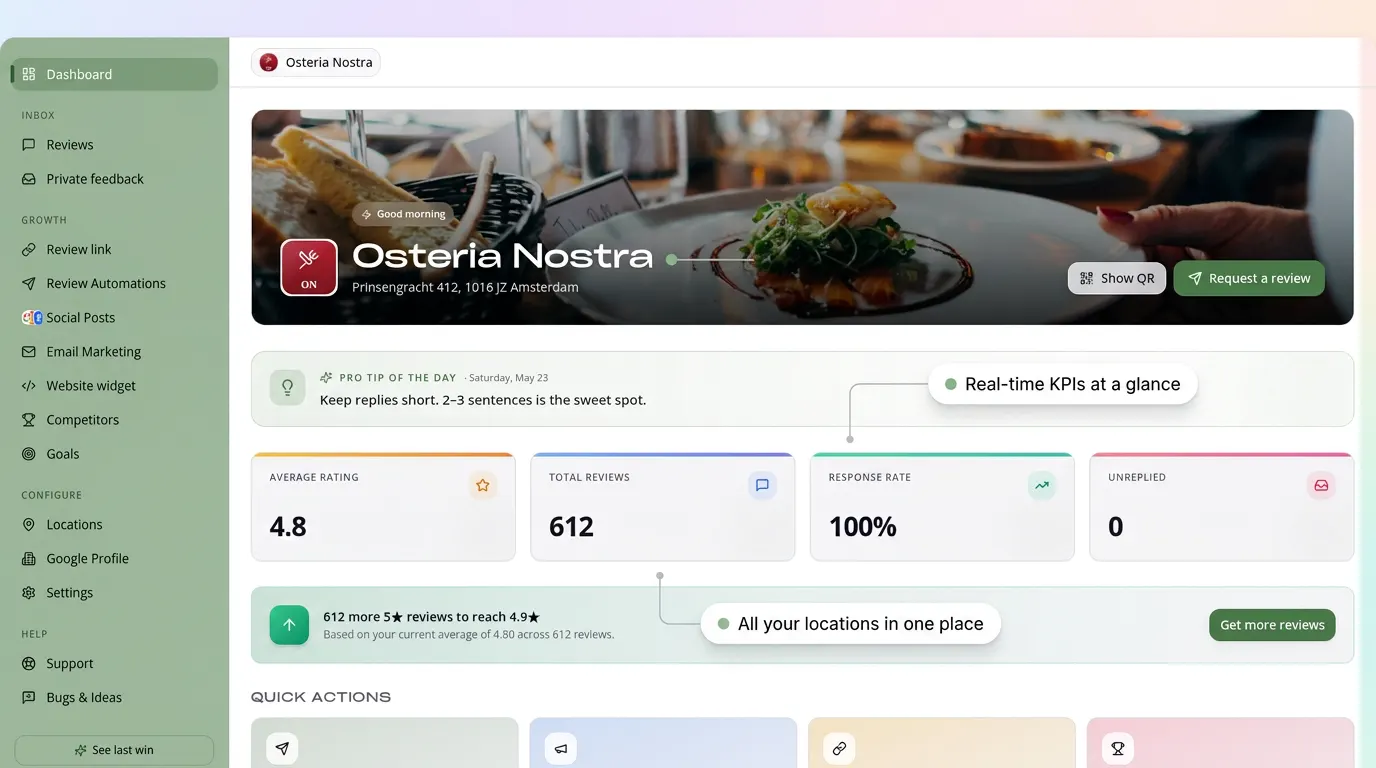
Every review is handled automatically
From feedback to growth - RecensioAI handles everything so you can focus on your customers.
Scanning QR…
Customer scans the QR on the table or receipt.
Straight to Google. Higher ranking.
Customer is delighted
Happy customers get a one-tap path to your Google Business Profile, compounding social proof and visibility on every search.
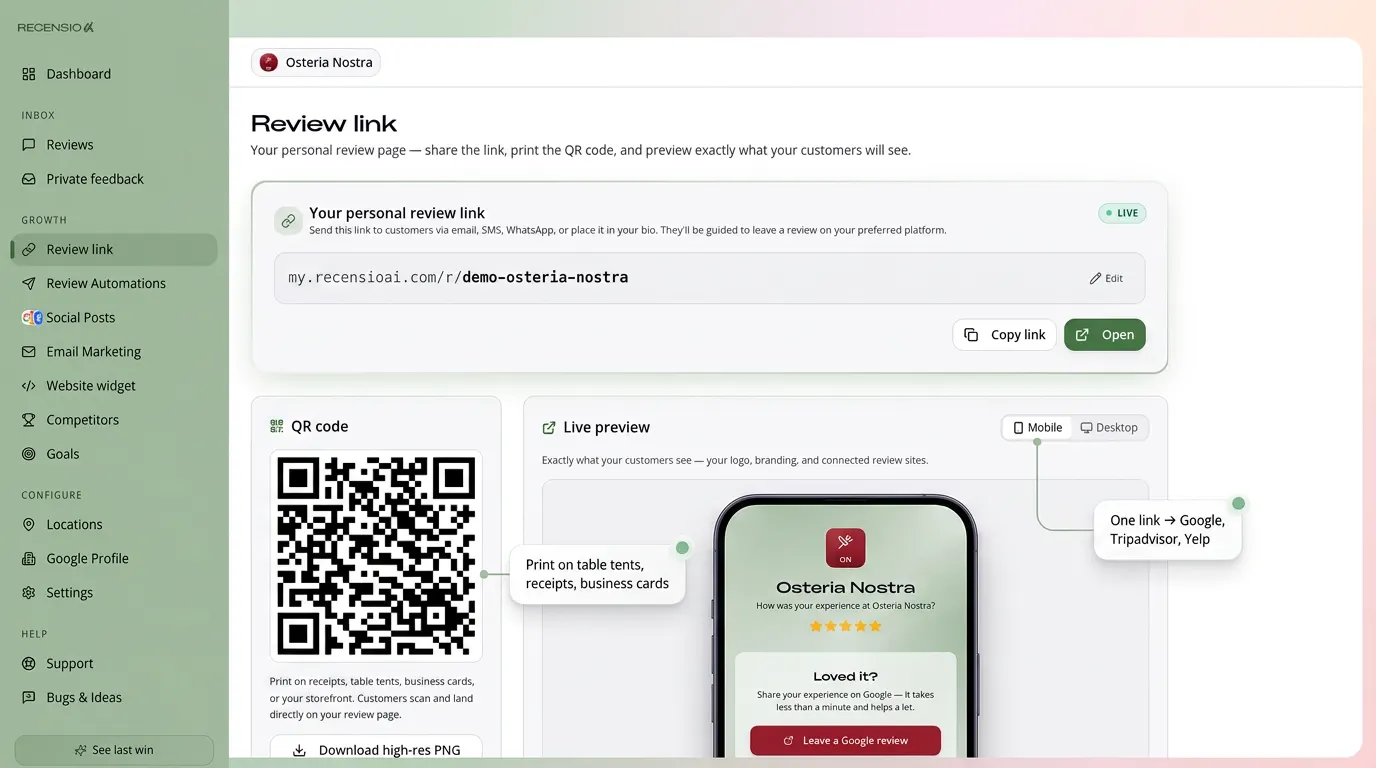
Customer scans your QR code or taps your review link
They see both options, leave a public review (Google + others) or send private feedback
Happy customer chooses Google in one tap, no extra forms
AI replies in your tone of voice within minutes, optionally shared on social
More visibility · Higher Google ranking · More customers
Don't fall for review gating.
Most competitors hide low-rating customers from Google. Google calls that review gating, it's against policy and can get your Business Profile suspended.
Other tools
Review gating
- Block 1–3 star customers from leaving a Google review
- Violates Google's review policies
- Risk of suspended or removed Business Profile
- Inflated rating, but reputation built on sand
RecensioAI
Fair-play growth
- Every customer is offered both options - Google review AND private feedback
- 100% within Google's Business Profile guidelines
- Zero suspension risk, built fair-play from day one
- Real 5-star growth from real fans, not from blocked reviews
Grow your Google profile up to 3× faster, fair, compliant, and built to last.
We don't just collect reviews. We help you spot patterns, fix problems fast, reply in your tone, and turn every review into a step toward your goals.
How review management software works
Four steps that repeat every week, all inside one platform here.
1. Collect
Review requests go out automatically by email, SMS or a QR code on the table, counter or receipt. Every customer gets the same simple ask, at the right moment.
2. Route
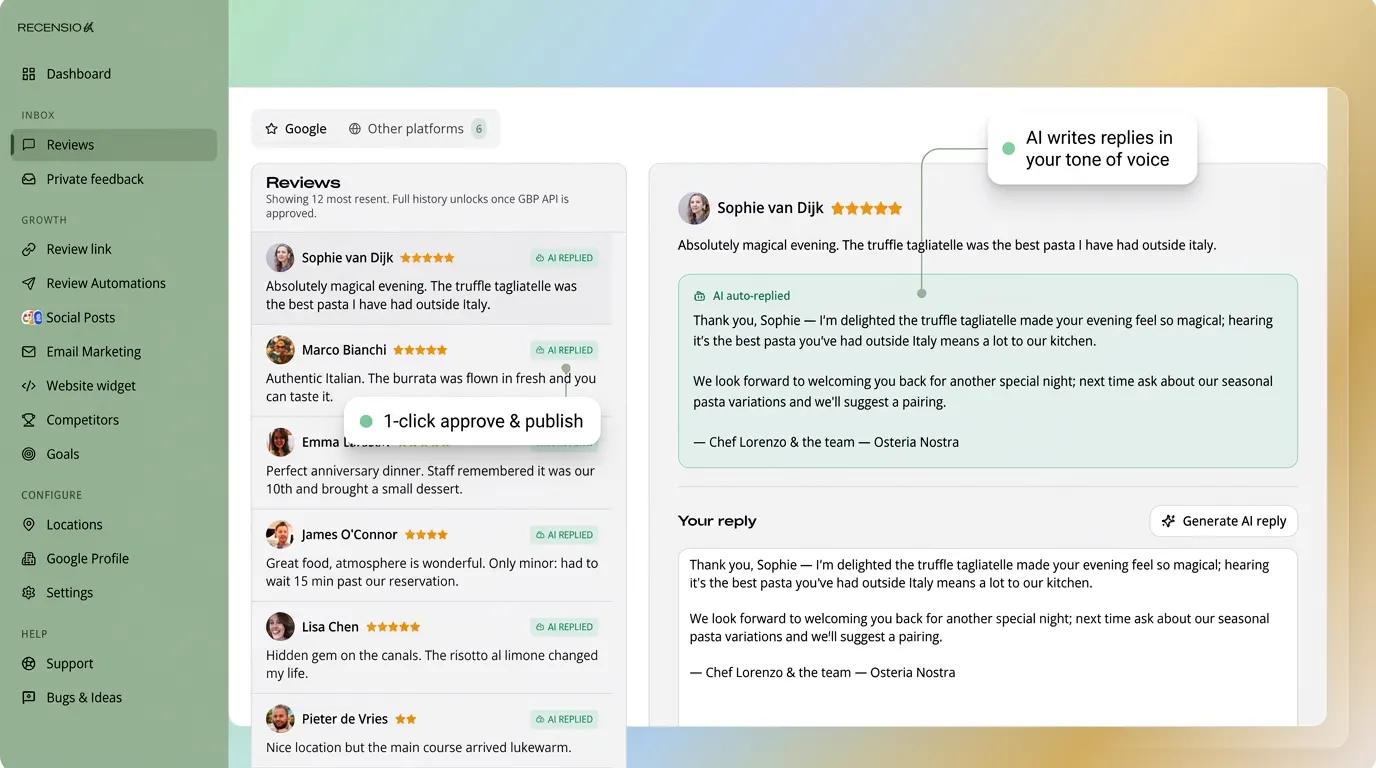
Every platform lands in one inbox. Filter by location, rating, platform or topic, negative reviews float to the top so they never sit for a day.
3. Reply
AI drafts a reply in your tone, in the customer's language. You read it, tweak it if you want, and publish. On sensitive reviews a human always stays in control.
4. Learn
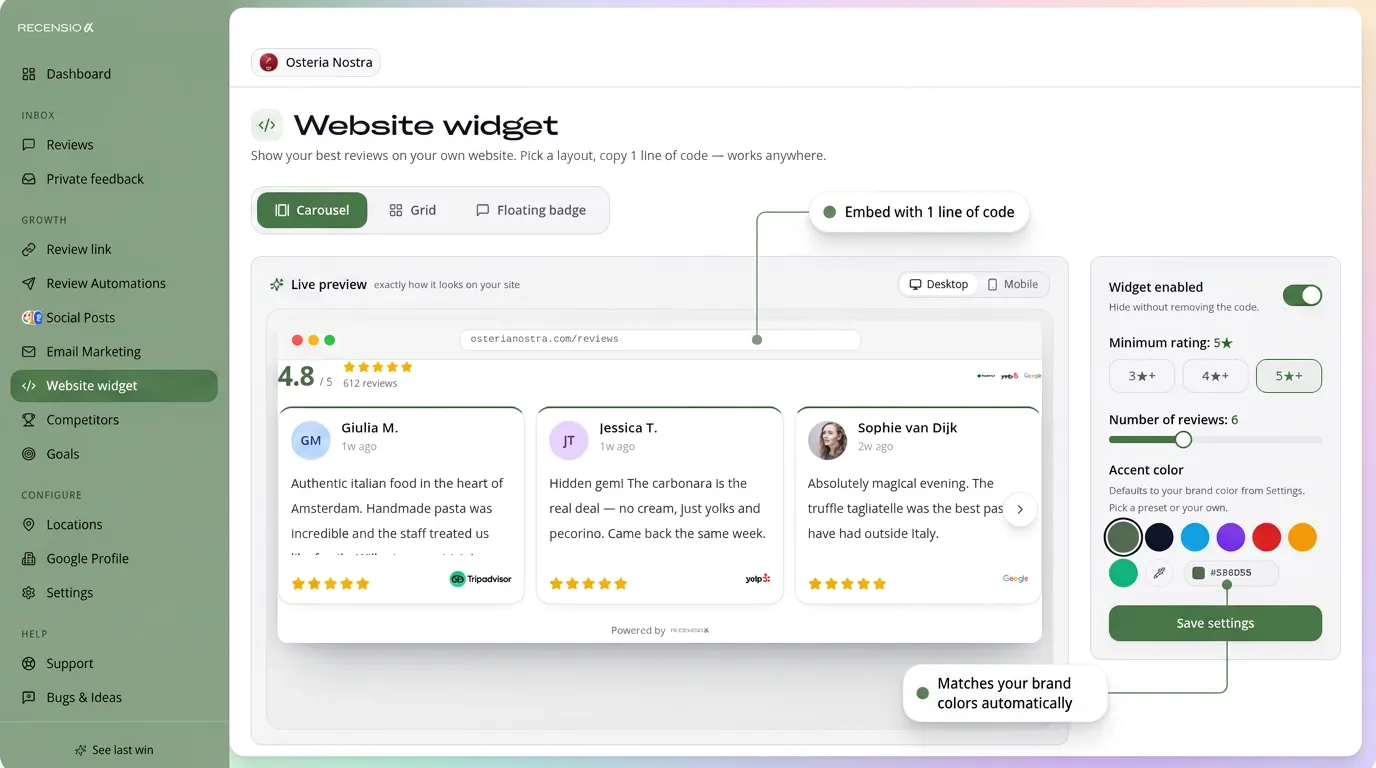
Sentiment and themes show what customers keep raising, wait times, staff, price. And your best reviews go straight onto your own website with a widget.
When do you need review software?
One location with a handful of reviews a month is fine by hand. Recognise two or more of these signals and manual work is costing you more than software.
| Signal | Manual workflow | With software |
|---|---|---|
| Multiple platforms | Logging into Google, Trustpilot and Booking separately every day | One inbox for every connected source |
| Several team members | Replies sound different every time | One shared tone of voice, drafts and approvals |
| Negative reviews | You spot them days later | Instant alert and a priority queue |
| Too few new reviews | Asking for a review gets forgotten when it's busy | Automatic requests after every visit |
| Multiple locations | Reports are rebuilt by hand in a spreadsheet | One dashboard with per-location numbers |
| Leadership wants numbers | Nobody knows the average response time | Rating, response time and sentiment in view |
What Can Review Management Software Do?
Don't judge software on the number of features in a sales deck, judge it on these eight things you use every week.
Shared review inbox
Google, Trustpilot, TripAdvisor, Booking and Facebook in one list, filtered by location and rating.
AI replies in your voice
The AI learns from your past replies and answers in the review's own language. You keep the final click.
Requests by email, SMS and QR
One review link, several channels. Includes printable QR posters and smart follow-ups.
Sentiment and smart filters
Automatic theme analysis shows what customers are happy or unhappy about.
Multi-location without per-seat pricing
From 1 to 500 locations in the same dashboard, with roles and permissions per user.
Google Business Profile sync
Reviews, posts and photos straight through the official Google API, no workarounds.
Widgets for your website
Show your best reviews on your site with a one-line script, including schema markup.
Reporting you actually use
Rating, response time, review growth and a benchmark against nearby competitors.
What AI should, and shouldn't, do
AI is strong at the first draft and at spotting patterns. Judgement on sensitive situations stays with you.
Let AI do this
- First drafts for positive, mixed and negative reviews
- Replies in the reviewer's own language
- Matching the tone you normally write in
- Grouping topics across hundreds of reviews
- Flagging which review needs urgent attention
Keep this with a human
- •Replies about safety, health or staff complaints
- •Promises about money, compensation or legal matters
- •The decision to report a review to Google
- •The final check before publishing on 1 to 3 stars
New: customers increasingly find you through AI
More and more people ask ChatGPT, Gemini or Perplexity for a recommendation nearby. Those answers are built on public sources: your Google Business Profile, your reviews and how you respond to them. A current profile with fresh, answered reviews now matters not just for Google, but for AI answers too.
How much time do review replies cost you today?
Slide in your own numbers and see what AI drafts save you.
Estimated saving per month
≈ $135 of team time
Based on AI drafts that you still read and approve yourself. An indication, not a promise.
Checklist: what to look for when choosing
Test every tool with your own reviews, not with the vendor's demo data.
- AI replies that learn your tone, not template macros
- A direct connection to the official Google Business Profile API
- Multilingual replies in the reviewer's own language
- Review requests by email, SMS and QR in the base plan
- A real multi-location view, not only on the priciest plan
- Sentiment analysis and topic filters
- Website widgets with schema markup for SEO
- No mandatory implementation fee or annual contract
- GDPR compliant with a data processing agreement available
- A workflow that stays inside Google's review policies
RecensioAI compared to legacy platforms
| Item | RecensioAI | Legacy platforms |
|---|---|---|
| AI replies trained on your tone | Templates | |
| Google Business Profile sync | Limited / paid add-on | |
| QR review poster included | Sold separately | |
| Multi-location dashboard | Enterprise plan only | |
| Sentiment and smart inbox | Add-on | |
| Implementation fee | $0 | $500–$2,000 |
| Contract | Monthly | Annual |
Other vendors' prices and features vary per plan; always check their current page.
Who Is Review Management Software For?
Review software is suitable for any business that has customer contact and wants to be visible online.
Local businesses
Restaurants, hairdressers, dentists and other local businesses that depend on Google visibility and word-of-mouth.
Service providers
Lawyers, accountants, real estate agents and consultants who need to build trust before the first contact.
Multi-location businesses
Chains and franchises that want to centrally manage and compare reviews for multiple locations.
Marketing agencies
Agencies that offer review management as a service to their clients via a white-label dashboard.
What owners notice
Customers stay anonymous at their own request.
I used to bounce between four dashboards. Now I handle reviews and Google posts from one screen, and my Saturday mornings are mine again.
Our rating went from 3.8 to 4.6 in three months. The real difference: we now reply within a day instead of never.
I'm not a marketing person. The requests go out on their own and the AI writes the reply. I check in twice a week.
How does your Google Business Profile score?
Run a free Google Business Profile check and discover where you can improve.
FAQ
Frequently asked questions about review management software
Ready for the Best Review Software?
Start today with RecensioAI. Start your 14-day free trial, no credit card required.
Cancel monthly · No credit card required · 14 days free
Keep reading
Free AI review reply generator
Paste any Google review and get an instant, professional response, choose tone, length and language.
Read moreHow to get more Google reviews
10 proven strategies to collect more 5-star reviews on Google Maps.
Read moreCollect Google reviews
Automatically collect Google reviews via email, SMS and QR codes.
Read moreReview Management Software: What It Is and How to Choose (2026)
What review management software is, how it works and how to choose one. Includes a live demo, comparison tables, a buyer's checklist and a time-saved calculator.
What is review management software?
Review management software is one platform where you collect, monitor, reply to and learn from customer reviews. Instead of logging into Google, Trustpilot or Booking.com separately, every review lands in one inbox, AI helps you draft the reply, and reporting shows you what customers keep talking about.
How it works
1. Collect: Review requests go out automatically by email, SMS or a QR code on the table, counter or receipt. Every customer gets the same simple ask, at the right moment. 2. Route: Every platform lands in one inbox. Filter by location, rating, platform or topic, negative reviews float to the top so they never sit for a day. 3. Reply: AI drafts a reply in your tone, in the customer's language. You read it, tweak it if you want, and publish. On sensitive reviews a human always stays in control. 4. Learn: Sentiment and themes show what customers keep raising, wait times, staff, price. And your best reviews go straight onto your own website with a widget.
When do you need it?
Multiple platforms - Logging into Google, Trustpilot and Booking separately every day → One inbox for every connected source Several team members - Replies sound different every time → One shared tone of voice, drafts and approvals Negative reviews - You spot them days later → Instant alert and a priority queue Too few new reviews - Asking for a review gets forgotten when it's busy → Automatic requests after every visit Multiple locations - Reports are rebuilt by hand in a spreadsheet → One dashboard with per-location numbers Leadership wants numbers - Nobody knows the average response time → Rating, response time and sentiment in view
Features
Shared review inbox: Google, Trustpilot, TripAdvisor, Booking and Facebook in one list, filtered by location and rating. AI replies in your voice: The AI learns from your past replies and answers in the review's own language. You keep the final click. Requests by email, SMS and QR: One review link, several channels. Includes printable QR posters and smart follow-ups. Sentiment and smart filters: Automatic theme analysis shows what customers are happy or unhappy about. Multi-location without per-seat pricing: From 1 to 500 locations in the same dashboard, with roles and permissions per user. Google Business Profile sync: Reviews, posts and photos straight through the official Google API, no workarounds. Widgets for your website: Show your best reviews on your site with a one-line script, including schema markup. Reporting you actually use: Rating, response time, review growth and a benchmark against nearby competitors.
Buyer's checklist
AI replies that learn your tone, not template macros · A direct connection to the official Google Business Profile API · Multilingual replies in the reviewer's own language · Review requests by email, SMS and QR in the base plan · A real multi-location view, not only on the priciest plan · Sentiment analysis and topic filters · Website widgets with schema markup for SEO · No mandatory implementation fee or annual contract · GDPR compliant with a data processing agreement available · A workflow that stays inside Google's review policies
Frequently asked questions
- What is review management software?
- Review management software is one platform where you collect, monitor, reply to and analyse customer reviews. It brings Google, Trustpilot, TripAdvisor and other sources into a single inbox, helps you reply with AI drafts, and reports on what customers keep raising.
- What is the best review management app?
- There's no single best app for everyone, it depends on your number of locations, your platforms and your budget. For local businesses the deciding factors are usually AI replies, a direct Google connection, QR requests and a monthly contract. We compared eight platforms side by side in our review management software comparison.
- What are the best customer review platforms?
- For most local businesses Google matters most by far, because it drives your visibility in Maps and local search. After that come sector-specific platforms: Trustpilot for e-commerce and services, TripAdvisor and Booking.com for hospitality, and Facebook for local reach. Pick the two or three platforms your customers actually check and keep those current.
- Which app is best for managing reviews?
- Pick the app that handles the four basics without detours: collect, route, reply and report. Test it with your own reviews, connect your profile, filter to one star, generate a reply and open the report. If that feels slow or complicated, your team won't use it.
- How do I manage my reviews?
- Work to a rhythm: ask for a review after every visit, check your inbox daily, reply to every review within 24 to 48 hours, and review the recurring themes once a month. On negative reviews, keep it short and factual, offer to solve it off-platform, and write for the person reading it later, not only for the upset customer.
- How much does review management software cost?
- Roughly $30 to $500+ per month, depending on features and number of locations. RecensioAI starts at $77 per month with all core features included, no implementation fee and a monthly contract.
- Does the software publish replies automatically?
- That's your choice. You can let positive reviews be answered automatically; for three stars or lower we recommend human approval. That keeps the speed without losing control.
- Is this allowed under Google's policies?
- Yes. You ask every customer for a review, not just the happy ones, and everyone always sees both the option to leave a public review and the option to send private feedback. We never buy, gate or incentivise reviews.
- What's the difference from reputation management software?
- Review management is the operational part: collecting, replying to and analysing reviews. Reputation management is broader and also covers brand mentions, social listening and how you appear in search results.
- How long does setup take?
- Usually under ten minutes: connect your Google Business Profile, import existing reviews and set the AI to your tone. Guidance is included.
- Do I need this as a small business?
- From roughly twenty reviews a month it usually pays for itself in saved time and faster replies. With just a few reviews a month, doing it manually is perfectly fine.
- Can I combine it with my existing tools?
- Yes. RecensioAI connects to common platforms and offers API and Zapier access, so it runs alongside your CRM, POS or booking system.