
How to Beat Your Competitors on Google in 2026
The complete playbook to outrank local competitors on Google Maps in 2026: how many reviews you need to overtake the business above you, how to break into the top 3, and how RecensioAI runs the work for you, with real screenshots from the app.
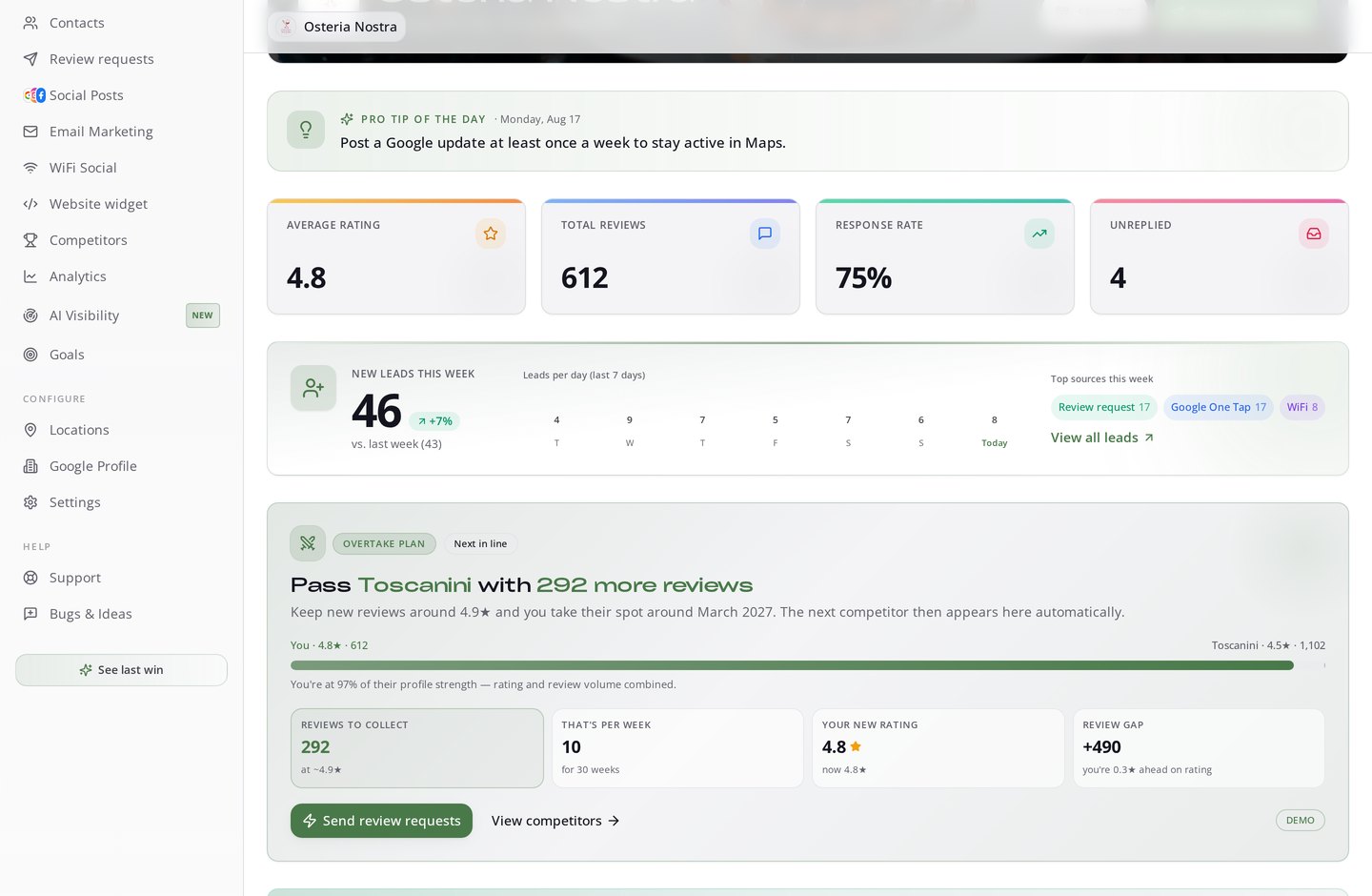
Table of Contents
- 1The short answer
- 2Step 1 - Know your exact review gap
- 3Step 2 - Aim for the local top 3, not for 'page one'
- 4Step 3 - See where you actually rank (from every corner of your city)
- 5Step 4 - Turn the plan into reviews, automatically
- 6Step 5 - Reply to every review within hours (without writing them)
- 7Step 6 - Look alive: Google Updates, photos and social posts
- 8Step 7 - Measure what matters (and get warned early)
- 9A worked example: 4.4★ restaurant, stuck at #6
- 10What loses the race
- 11Start with the number you don't have yet
The short answer
Beating your competitors on Google Maps is not a mystery and it is not luck. Google ranks local businesses on three things: relevance, distance and prominence. You cannot move your building, and your category is mostly fixed, so the lever that actually decides who wins the local top 3 is prominence: how many reviews you have, how good they are, how fresh they are, how fast you reply, and how active your profile looks. That is measurable. Which means overtaking the business ranked above you can be turned into a number: *X more reviews, at Y stars, in Z weeks.* That number is exactly what RecensioAI puts on your dashboard every morning.
Step 1 - Know your exact review gap
Most owners have no idea how far behind they actually are. They guess. We calculate. RecensioAI compares your profile strength against the businesses that show up for your keyword in your radius, and turns the difference into one sentence you can act on today: how many reviews you need to collect to pass the next business above you, what pace that means per week, and roughly when you take their spot.
In the example below, the business is at 4.8★ with 612 reviews. The competitor in front sits at 4.5★ with 1,102 reviews. RecensioAI does the math: 292 more reviews at ~4.9★ - about 10 per week, and you take their place. No vague advice. A target.
Step 2 - Aim for the local top 3, not for 'page one'
On mobile, Google shows a map with three businesses. That is the real battlefield, the 'map pack'. Positions 1–3 collect the large majority of clicks, calls and direction requests for 'near me' searches. Position 7 might as well not exist.
So the smart play is not 'become number one'. It is: overtake third place first. That is the shortest, cheapest, most winnable jump, and once you are in, you defend from inside the pack instead of attacking it from outside.
- Top positions (1–3), roughly 60–70% of clicks in local results
- Positions 4–10, 20–30% of clicks
- Positions 11–20, 5–10%
- Position 21+ - 2–3%. Effectively invisible
Step 3 - See where you actually rank (from every corner of your city)
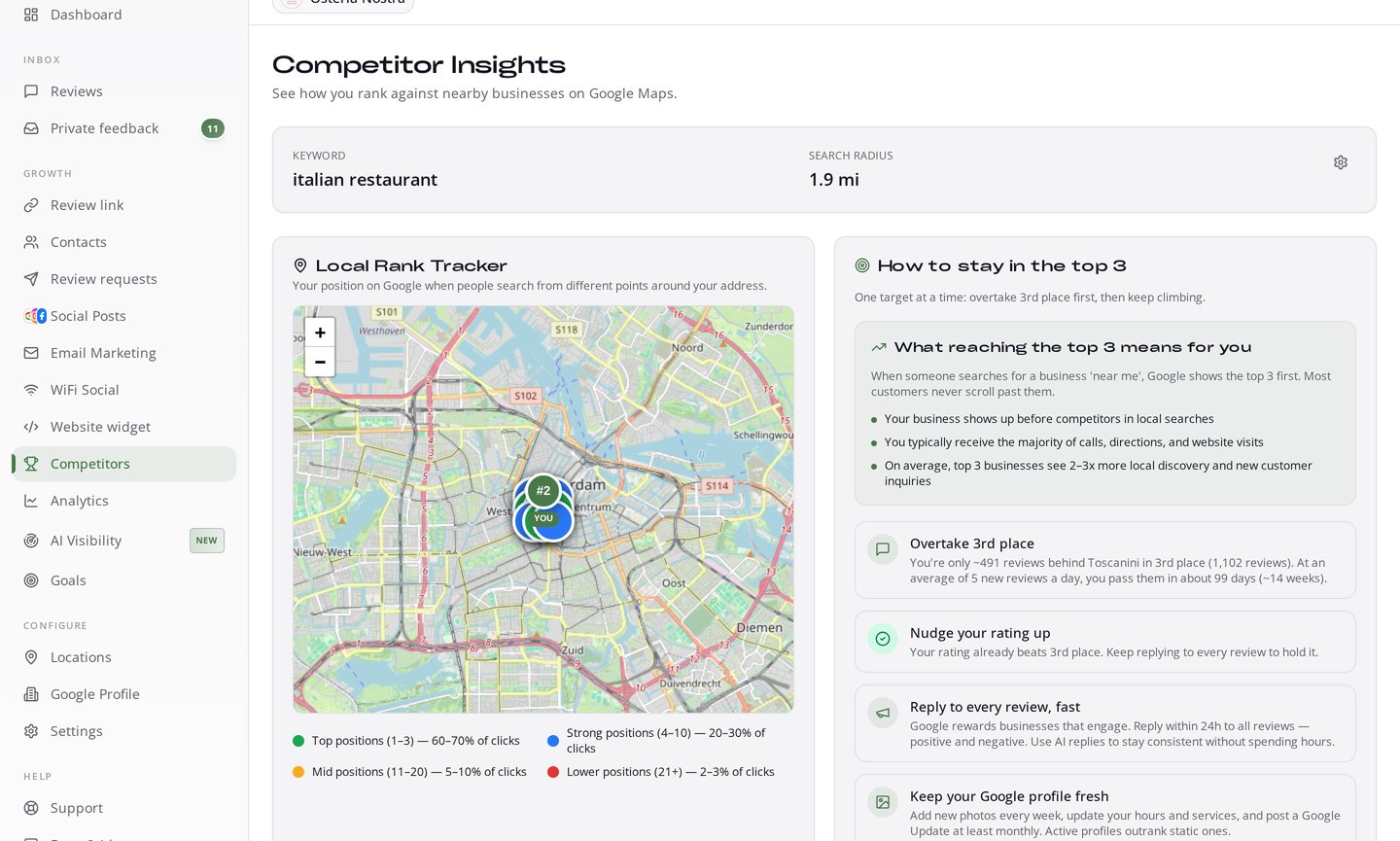
Your ranking is not one number. It changes depending on where the searcher is standing. Someone two streets away may see you at #2, someone across the river may never see you at all. RecensioAI's Local Rank Tracker checks your position for your keyword from multiple points around your address, so you know where you are strong and where you are invisible.
Right next to it, the app tells you what to do about it: which competitor to overtake, how far behind you are, and the exact steps to close the gap, including what reaching the top 3 will mean for your business once you get there.
Step 4 - Turn the plan into reviews, automatically
Knowing you need 10 reviews a week is useless if you have to ask for them by hand. This is where most businesses stall, and where RecensioAI does the work in the background. Every channel you already have becomes a review channel.
- Review link & QR, one tap from table, counter, invoice or receipt straight to your Google review form
- Automated review requests, email and SMS at the right moment, in the customer's language
- Wi-Fi Social, guests log into your Wi-Fi, you collect the contact and the review request follows
- Private feedback, unhappy customers get a private channel *alongside* the public option, so you can fix the problem before it becomes a 1-star
- Reminders that stop themselves, if someone starts a review and never finishes, they get a gentle nudge; the moment a review lands, the nudges stop
- CRM & POS integrations, bookings and orders trigger requests without anyone lifting a finger
Step 5 - Reply to every review within hours (without writing them)
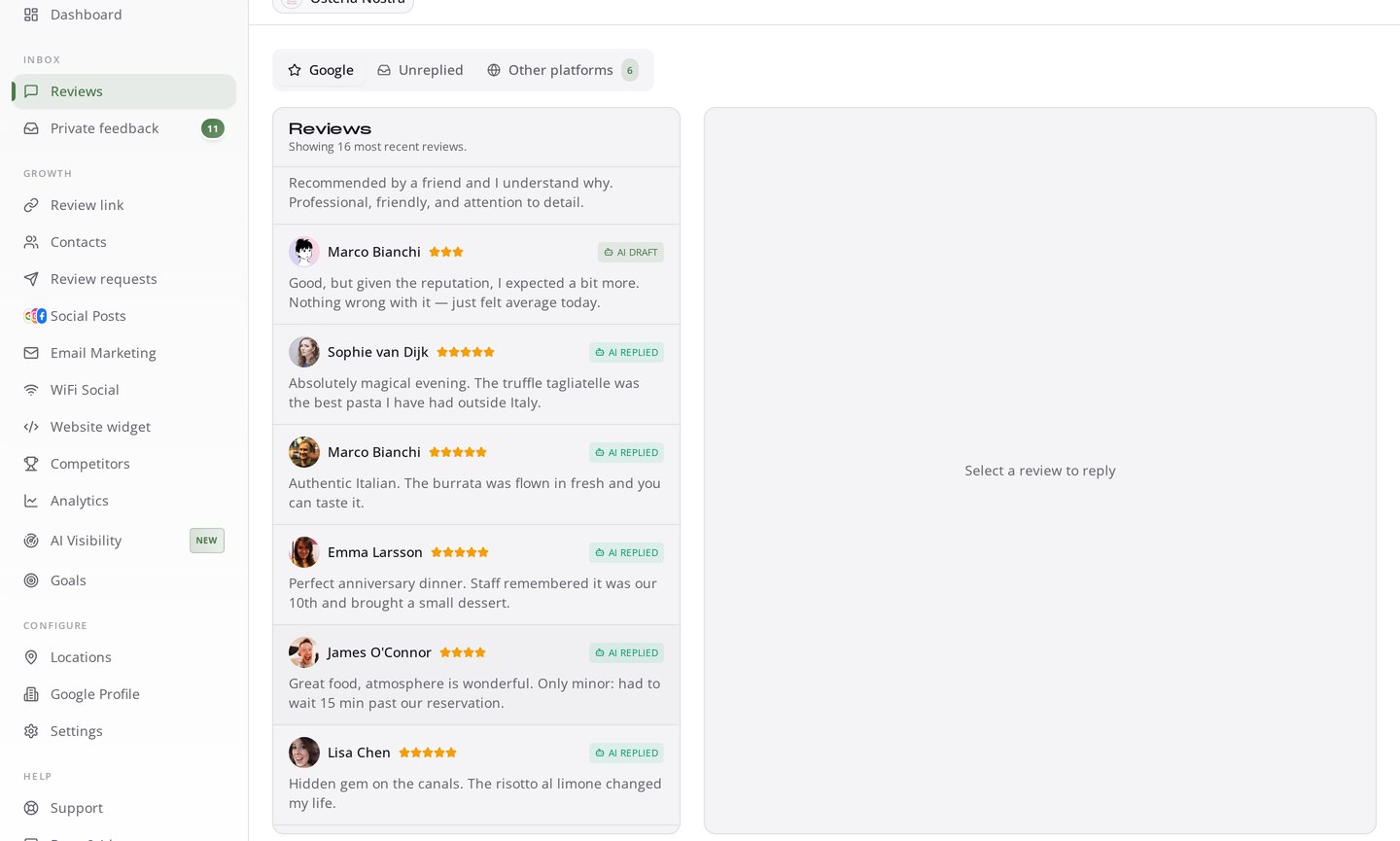
Reply rate is a prominence signal, and it is also the cheapest trust win on the internet: customers read your replies before they read your reviews. RecensioAI drafts a reply for every incoming review in the reviewer's own language, in your tone of voice, and, on Pro, publishes it automatically. Negative reviews are held for your approval, escalated to you instead of quietly slipping through.
Step 6 - Look alive: Google Updates, photos and social posts
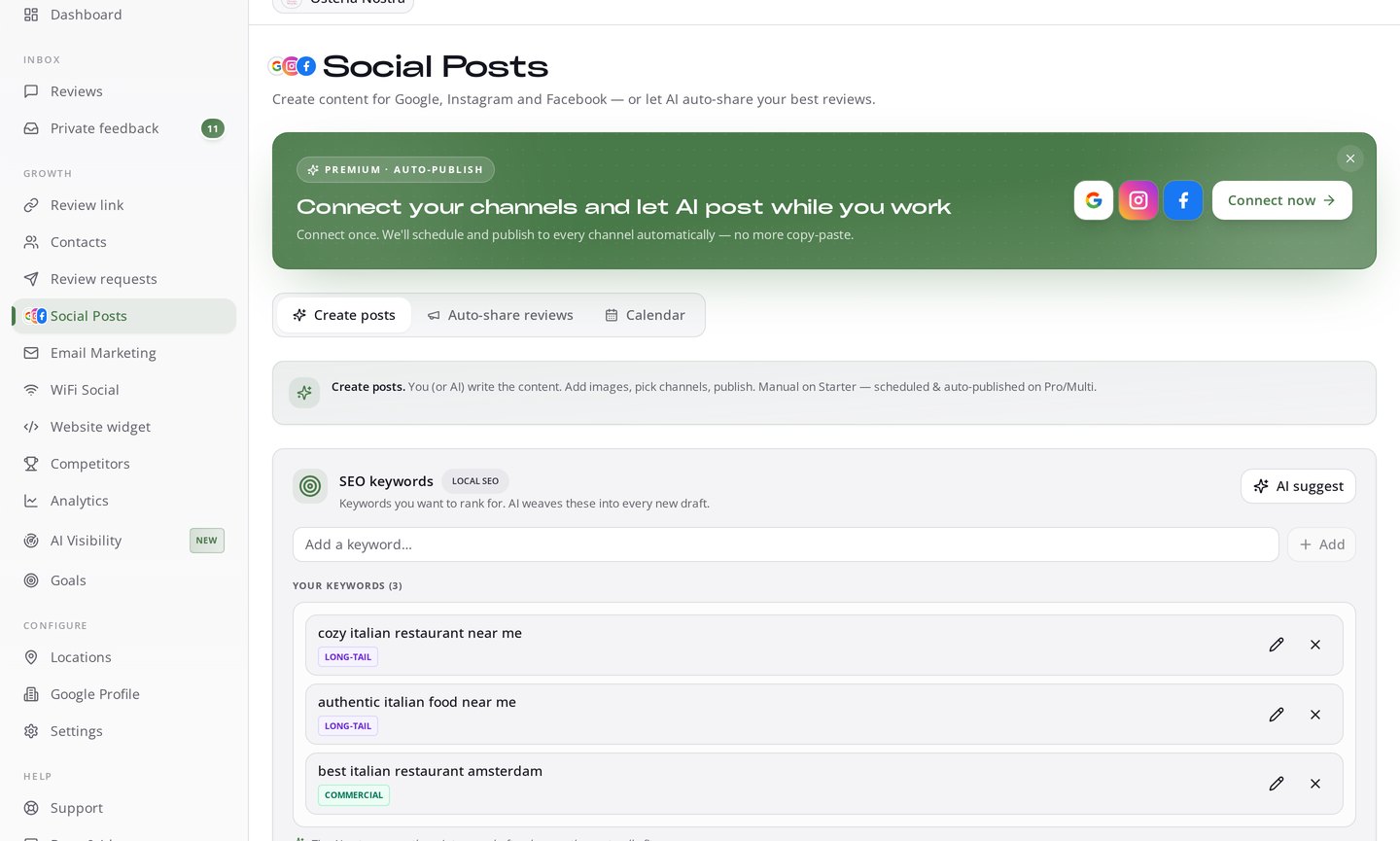
Two profiles with the same rating do not rank the same. An active profile, fresh photos, weekly Google Updates, complete services and hours, outranks a static one. RecensioAI writes and schedules your Google Updates around the keywords you want to rank for, and pushes the same content to Instagram and Facebook so one action feeds three channels.
Step 7 - Measure what matters (and get warned early)
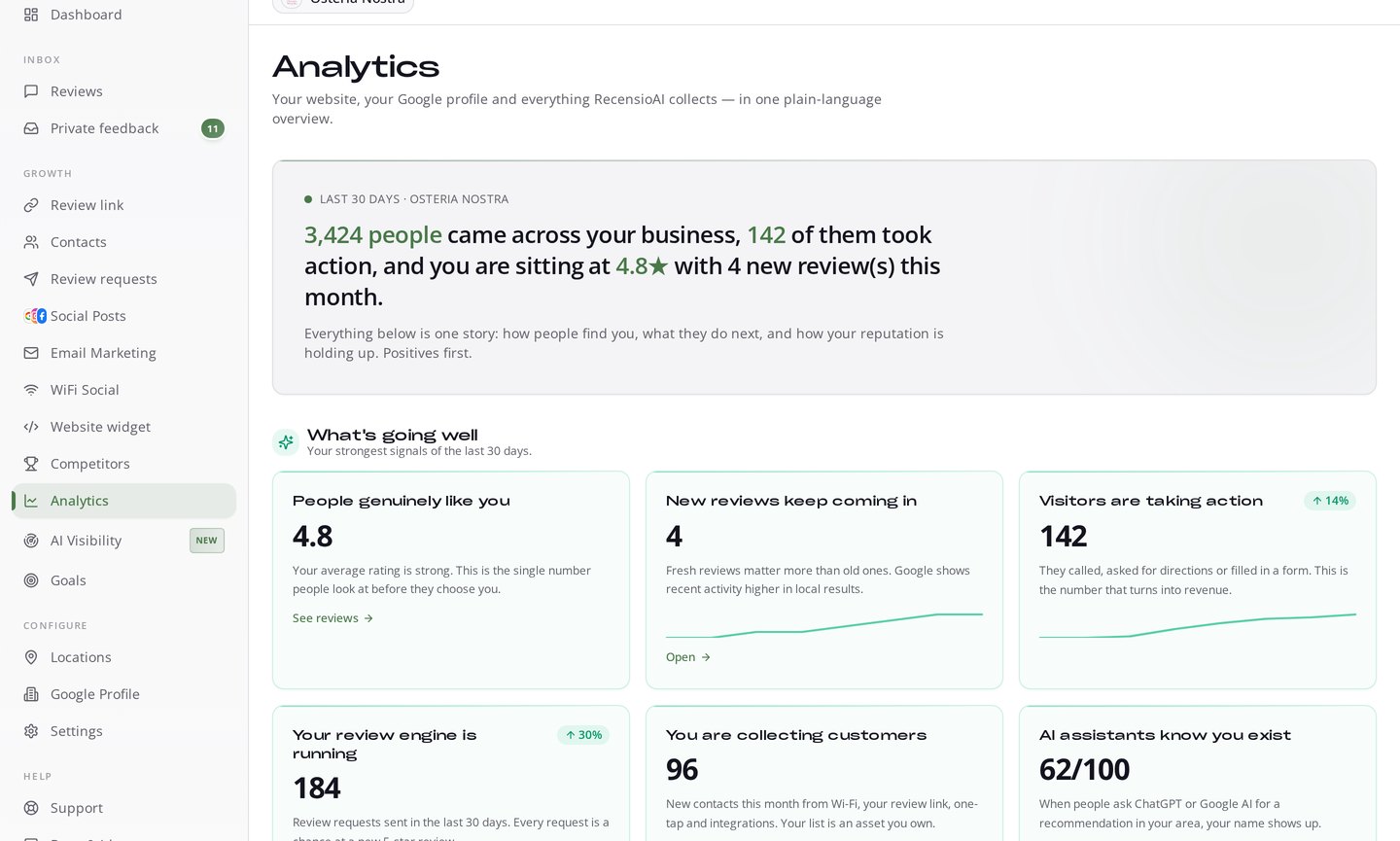
Analytics in RecensioAI is written in plain language, not dashboards for the sake of dashboards: how many people came across your business, how many took action, where your rating is going, how your review engine is performing, and whether AI assistants like ChatGPT mention you when people ask for a recommendation in your area.
And it works both ways. When you climb, you get a celebration with the rivals you just passed. When a competitor is closing in on you, you hear about it while there is still time to react.
A worked example: 4.4★ restaurant, stuck at #6
A restaurant sits at 4.4★ with 180 reviews. Third place has 4.6★ with 310 reviews. The gap looks brutal, until you break it down. RecensioAI sets the target at 3rd place only, and assumes 5 new reviews a day from an active review link, Wi-Fi capture and automated requests.
That is 35 reviews a week. The volume gap closes in roughly 4 weeks, and because new reviews come in at 4.9★, the average lifts from 4.4 to ~4.6 in the same window. Two months in: inside the top 3, with a stronger rating than the business that used to sit above them, and Google Updates going out weekly the whole time. Nothing exotic. Just a number, a system, and consistency.
What loses the race
We scan thousands of Google Business Profiles. The businesses that stay stuck almost always make the same handful of mistakes:
- Asking for reviews in bursts, then going quiet for months - Google rewards steady flow
- Buying reviews. It is against Google's policy and it gets filtered or penalised
- Only asking happy customers and hiding the rest, offer a private channel *next to* the Google option, never instead of it
- Never replying, or replying only to the bad ones
- A profile that hasn't changed since 2023: no new photos, no updates, incomplete services
- Watching your own rating and never watching the competitor who is about to pass you
Start with the number you don't have yet
You cannot beat a competitor you haven't measured. The free scan checks your Google Business Profile, benchmarks you against comparable businesses in your area and shows exactly where you stand, rating, review volume, reply rate and profile completeness, in about a minute, no account needed.
Run your free Google Business Profile scan and see how far you are from the top 3. Then start a free 14-day trial and let the app close the gap for you. Want to sanity-check the maths first? Use the Google review calculator.
Frequently asked questions
You might also like
Handpicked articles for you
Connect Your POS or CRM and Get Google Reviews Automatically (2026)
Integrate your POS, online store, booking system or CRM with RecensioAI and every customer gets a review request automatically. How it works, every integration we support, and how to go live in 3 steps.
Google Review Link or QR Code: Which Works Better for More Reviews?
Should you send customers a review link or have them scan a QR code? We compare both methods on conversion, ease of use and results. With data and practical tips.
7 Free Tools for Local Businesses to Boost Your Online Reputation
Discover RecensioAI's 7 free tools that help local businesses worldwide improve their Google reviews, online reputation and local visibility, at zero cost.